Logging Out of Facebook
Click on the arrow in the corner on your desktop or, scoll down to the last option in hamburger-menu sign in the facebook app, to see the Log Out button. That’s it, right?
Technically yes, but unfortunately not quite.
You see, a casual ‘Let me use your phone in the confidence that you will log-it-out later for my benefit’ causes a great vulnerability in the impressive security that facebook provides. This is the human-problem with security systems and are the basis for many social engineering attacks. One of these attacks is impersonation or, identity theft.
It is quite serious but fortunately there are a couple of ways to get around it.(thanks, Mark!). We’ll discuss two handy solutions which will allow us to log out of all devices that are currently using a particular facebook account (NOTE: This will also log out anyone using the Messenger application, as it is directly dependent on facebook)
Please follow ONE of the two possible solutions
RESET ALL INSTANCES
Use this method if you remember your Email-ID and mobile number that is associated with facebook. You’ll need to have access to both your Email and Phone number, as facebook will be verifying you on that basis
- In a PC, log out of any open instances of facebook and then Go to
https://www.facebook.com/hacked- Click
My Account is Compromised - Type Email Id or Phone Number associated with that account
- Facebook should return with a page that has one(or multiple) suggestions. Choose the account you want to reset. Then Enter the recent password that you remember
- Follow the steps to reset your account. If is fairly simple from this point onwards. If you answer all the questions satisfactority, you will receive an email to create a new password and all people(and devices) currently logged-in to your account will be logged-out by force
- Click
- In a PC, log out of any open instances of facebook and then Go to
MANUALLY KILL EXISTING LOGINS
Use this step, if you are unsure(or, not confident) if you can recall your email/pw credentials.
- Login to your account on a PC
- Go to this link
https://www.facebook.com/settings - Click on the
Security and loginmenu-option on the left. - On the second panel, you’ll see a list of devices in which your account is(or, has been) active.
- INSTRUCTIONS BELOW:
You will not be allowed to log out of the device that you are currently using. But, you can right click on the dotted option menu and log out of other suspicious devices that may be using your account.
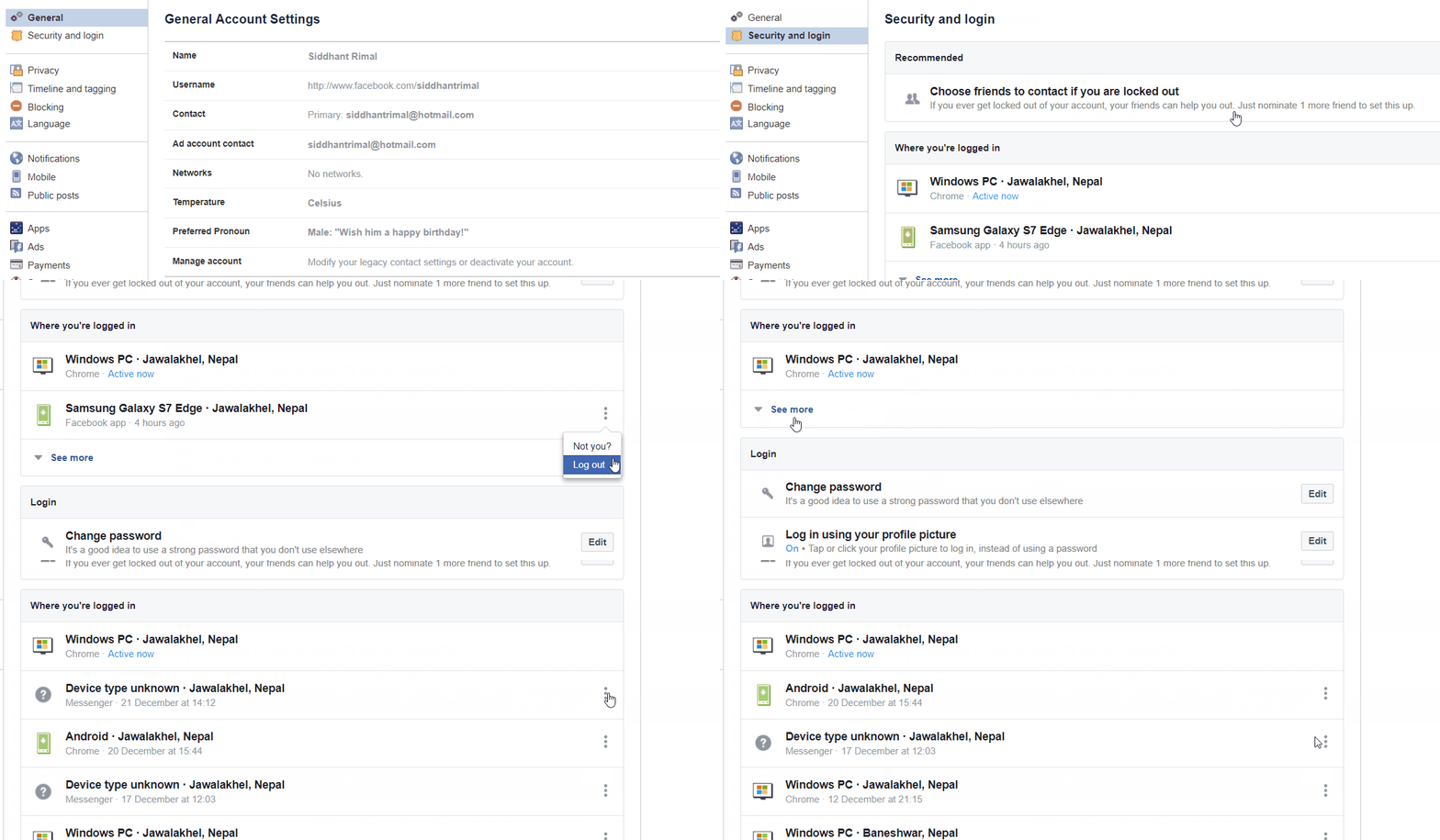
- INSTRUCTIONS BELOW:
- This way, you’ll be able to log out of other devices using your facebook/messenger account.